ISO Audits & Compliance
Multi-Standard ISO Audit Management & Compliance Platform
Plan, execute, close, and evidence-manage audits across ISO 9001, 14001, 45001, and custom standards with a centralized digital audit intelligence platform.
Plan, execute, close, and evidence-manage audits across ISO 9001, 14001, 45001, and custom standards with a centralized digital audit intelligence platform.
From audit planning and scheduling to execution, evidence collection, CAPA, and closure — one platform.
Annual audit calendar, auditor assignment, scope definition, department scheduling, and resource allocation.
Digital checklists, question bank by ISO standard, real-time finding capture, observation logging, and evidence attachment.
Centralized evidence repository — attach photos, documents, records — linked to specific audit findings and clauses.
Corrective actions, preventive actions, and non-conformance records — assigned, tracked, escalated, and closed digitally.
Real-time compliance dashboards — audit completion rates, open findings, CAPA closure rates, and standard-wise compliance scores.
Manage ISO 9001, 14001, 45001, 27001, and custom internal audit standards from one unified platform.
Cresolv One's ISO platform (iSOft Pro) is a web application, so nothing is installed and every user works in the browser. Audits are the core, but the same system holds the records an auditor asks for around them. Which modules you switch on depends on what your team needs.
| Module | What it covers |
|---|---|
| ISO Audit | Plan and schedule internal and supplier audits, answer checklists, raise findings, run corrective action review and close with an audit report. |
| NCR | Non-conformity reports raised outside a scheduled audit, for example from a client complaint, an HSE issue, a legal issue or a repeated non-conformity, with an investigation and corrective-action workflow. |
| MOC | Management of change: log a change to a document, equipment, key personnel, KPI or organisation, rate its impact, route it for approval and keep it linked to the controlled document it affects. |
| Document control (DMS) | A register of SOPs, policies, work instructions, forms and manuals, with each document type deciding who prepares it, who approves it and which departments can see it. |
| Management review (MRM) | Plan management review meetings, build the agenda from a library mapped to each standard, and record decisions and actions. |
| Risk | A risk register with a staged workflow and scoring driven by severity, likelihood and occurrence scales that administrators control. |
Each step has a named person responsible, so an open finding always shows who has to act next.
| Role | What they do |
|---|---|
| Audit Manager | Creates and schedules the audit: organisation, reference, type, criteria, department, audit window, scope, location, auditors and auditees. Later writes the audit remark that closes it. |
| Auditor | Adds questions and answers the checklist. For each one records observations, uploads evidence, marks the status as conforming, opportunity for improvement or non-conformity, sets a severity of low, medium or high and gives a due date. |
| Auditee executive | Records the correction, then the corrective action report: root cause, corrective action proposed and taken, review due date and reviewer. Also rates the audit from 1 to 5 per checkpoint. |
| Auditee head | Reviews the corrective action and approves or rejects it with a comment. The reviewer is sent a secure link by email, so they can act without creating a login. |
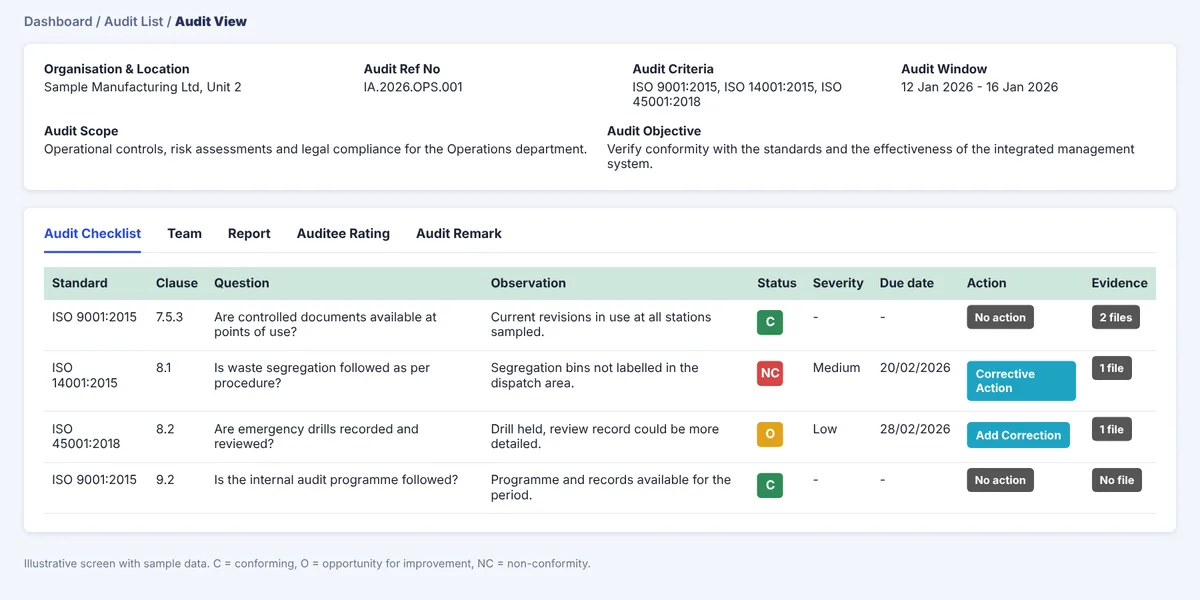
Once the audit is closed, the system generates the internal audit report: audit details, the checklist with observations and status, a summary of corrective actions and non-conformities with their due dates, totals by severity, opportunities for improvement, the overall rating and audit effectiveness.
Administrators set the system up once, and every audit draws on it.
The same approach applies to NCR sources and types, MOC risk types, document types and management review agendas, so each team can match the system to its own procedures.
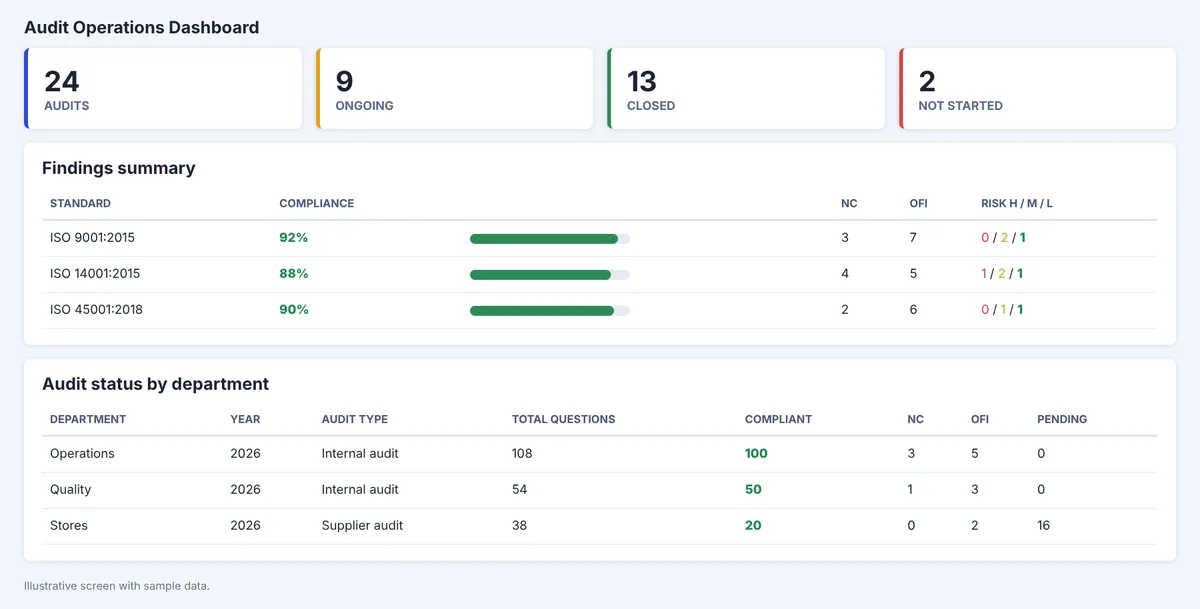
The audit dashboard shows audits by status (total, ongoing, closed and not started), a findings summary with compliance percentage, non-conformities, opportunities for improvement and the risk split, and tables by audit manager and by auditor. Lists can be exported to Excel. Standard reports cover audit compliance, auditor-wise audit listing, findings by audit manager, audit status, auditor rating and the audit issue register.
Access is decided in three layers, and all three must allow an action. A role needs the permission, the record must be within that role's scope, and the record must be at the right workflow stage with the right person acting on it. Management and audit heads see every record, while auditors see audits assigned to them and auditees see their own department's records. Compliance records are closed or superseded rather than deleted, which keeps the history an auditor expects to see.
To see how this maps to your standards and sites, ask for a walkthrough or read the ISO audit software buyer's guide.
An ISO compliance solution should make three things easy: running the audit programme on time, closing findings with evidence, and showing an auditor the current position without a scramble. Most teams start in spreadsheets and shared folders, which work until the number of sites, standards or auditors grows and nobody can say what is overdue.
When you compare options, look at whether one place holds the audit plan, the checklists, the findings and the corrective actions, whether each finding has an owner and a due date, and whether more than one standard can be managed together. Our ISO audit software buyer's guide sets out the questions to ask any vendor, and moving ISO audits from spreadsheets to digital covers the practical switch.
Whether you use software or not, an auditor will usually want to see the same basics. Check each of these before a surveillance or certification audit:
Teams that keep these current all year find the audit itself much less disruptive. To see how Cresolv One supports this across standards, talk to us about a pilot.
What quality and compliance teams ask about multi-standard ISO audit management. Read our full Buyer's Guide →
ISO 9001 (Quality Management), ISO 14001 (Environment), ISO 45001 (Occupational Health & Safety), and ISO 27001 (Information Security), plus custom internal audit standards — all run from one unified platform rather than separate trackers per standard.
The audit manager schedules the audit and writes the closing remark, the auditor answers the checklist and raises findings, the auditee executive records the correction and corrective action, and the auditee head reviews and approves or rejects it. The reviewer receives a secure email link, so they can act on a corrective action without creating a login.
Yes. Alongside audits, the platform has modules for non-conformity reports raised outside an audit, management of change, controlled documents and management review meetings, plus a risk register. You can switch on the modules you need.
It starts with digital checklists built from an ISO-standard question bank, but execution also captures findings and observations in real time during the audit and lets auditors attach evidence — photos, documents, records — directly against the relevant clause as they go, rather than reconstructing evidence after the fact.
Evidence is attached by finding and linked to the specific clause it supports, stored in a searchable central repository. When an auditor or reviewer opens a finding, the supporting evidence is right there rather than in a separate folder structure someone has to cross-reference manually.
An NRC (non-conformance record) captures what went wrong and against which clause; CAPA (corrective and preventive action) is the fix — assigned, tracked, escalated if overdue, and closed with sign-off verification. The platform links the two, so every non-conformance has a visible action trail through to closure.
Yes — multi-standard support means one platform, one audit calendar, and one evidence repository across ISO 9001, 14001, 45001, 27001, and custom standards, instead of running parallel systems or spreadsheets per certification.
The annual audit calendar handles auditor assignment, department scheduling, and resource allocation up front, and compliance dashboards surface open findings and upcoming deadlines so nothing slips past the scheduled date.
Real-time dashboards covering audit completion rates, open findings, CAPA closure rates, and standard-wise compliance scores — so a compliance head can see where the organization stands across all active ISO certifications without compiling a manual report.
This page covers the ISO-specific audit engine — planning, execution, evidence, and CAPA mechanics for ISO 9001/14001/45001/27001 audits. The Audit & Assurance Suite is the broader platform it sits inside, which also covers enterprise risk management, internal audit digitization beyond ISO, and document management — ISO Audits is one module within that suite, usable on its own or as part of the full suite.
Related reading
From planning to closure — Cresolv One makes every audit traceable, efficient, and compliance-ready.