AP Automation Case Study: An India E-commerce Company
How APIQ runs inward invoices, invoices without a PO, a vendor portal, gate-in and returns for a multi-warehouse e-commerce company, with the counts measured to October 2026.
This page describes how one India e-commerce company runs accounts payable on APIQ, our AP Automation product: inward invoices, invoices without a PO, a vendor portal, gate-in at the warehouses and returns to vendors. The client is masked. The counts were read from the live system on 31 October 2026.
Detail
Company
An India e-commerce company with many vendors and warehouses (client masked)
Products in use
APIQ (AP Automation), with the vendor portal and gate-in
Invoice flows
Material, Service, Non-PO Service and Import
ERP
SAP, integrated through an API
Period
January 2023 to 31 October 2026
Source
Counts read from the client's live installation on 31 October 2026
Inward invoices: sorted before anyone opens them
The work has four invoice flows and 15 gate locations. The first problem in a flow like this is not typing; it is that a person opens a pile and has to work out what is wrong with each invoice before they can act. In APIQ the invoice is parsed and then classified into a queue that already says what needs attention.
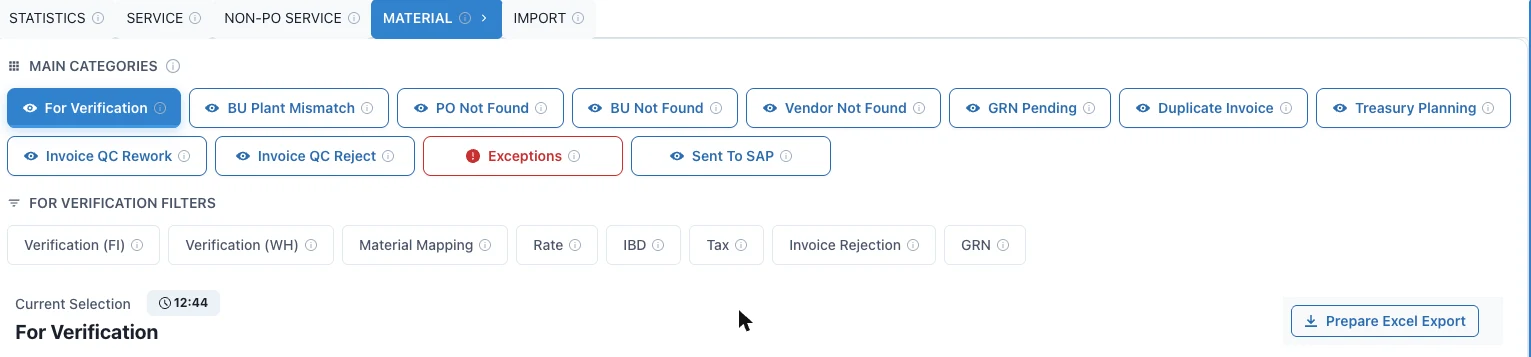
For material invoices the queues include For Verification, BU Plant Mismatch, PO Not Found, BU Not Found, Vendor Not Found, GRN Pending, Duplicate Invoice, Invoice QC Rework, Invoice QC Reject, Exceptions and Sent To SAP. Inside For Verification, a person filters by the check they own: finance, warehouse, material mapping, rate, tax, rejection or GRN.
Automatic allocation. Work is allocated to users automatically, by plant and role, and handled first in, first out. Nobody picks from a shared list.
People only where a decision is needed. Humans work the approvals and the exceptions. The rest moves on.
Posting with confirmation. Once an invoice is approved, it is pushed to SAP through an API and the response is read back as confirmation.
The material flow: invoice queues and the checks a person can filter on. Rows are not shown.
Invoices without a PO
Invoices with no purchase order are where AP teams usually lose track, because they arrive from many departments and nothing ties them to a goods receipt. In APIQ they follow one route: upload, approval, AP verification, then posting.
Stages you can see. Pending First Approval, Pending Second Approval, Pending AP Verification, Ready for accounting in the ERP, Completed and Rejected, plus My Uploads for the person who uploaded the invoice.
Approvals follow the client's policy. Whether a second approval is needed depends on the client's policy, so it is configured per client.
Department and cost centre on every invoice. GST and TDS checks apply here as well as on PO invoices.
The non-PO route: each invoice shows its stage, approvals, AP status and SAP status. Rows are not shown.
A vendor portal, so vendors answer their own questions
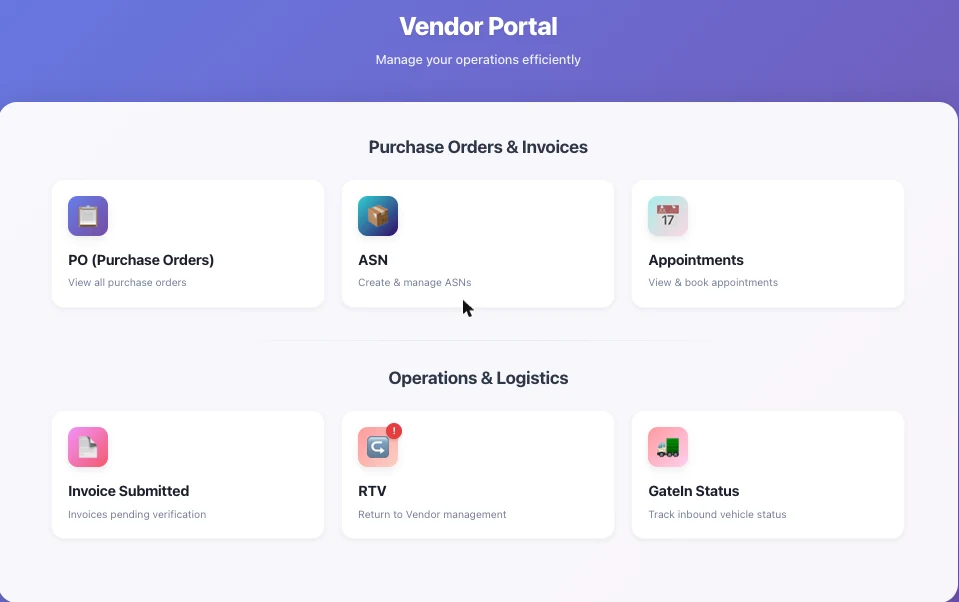
Each vendor has their own login. In the portal a vendor can view purchase orders, create and manage ASNs, view and book delivery appointments, submit invoices and follow them, see returns to vendor, and track the status of an inbound vehicle at the gate.
An ASN is checked against the PO and later against the invoice, so a mismatch shows up before payment instead of after it.
The vendor portal home. No client data appears on this screen.
Gate-in and returns
Security at each plant records the vehicle at the gate. The entry is matched to the vendor's appointment and ASN automatically, and it reaches the rest of the flow through the ERP API, not by re-keying. Each entry carries the invoice, the PO, the vendor's GSTIN, the quantity and boxes, and in and out times. The list can be exported, and a report gives the list of entries.
When a delivery fails the check, a warehouse executive rejects it under the client's operations policy and records a reason. The rejection stops the invoice from going to payment, and the vendor sees the return in their own portal.
What we measured, and what we have not
Measure
Count
Invoices in the system, January 2023 to October 2026
About 78,500
Gate-in entries recorded
124,439
Gate locations
15
Invoices flagged as duplicates
Around 3,000
User accounts, across finance, warehouse, sourcing and IT
More than 100
Roles
15
Reference-case counts from one production installation, read on 31 October 2026. They show scale, not improvement. We have not published a before-and-after figure because we do not hold a baseline from before APIQ for this client.
What a before-and-after figure needs is simple: how long invoices took from receipt to booking, and how many each person handled, before the system. Your pilot starts by capturing exactly that on one entity.
Is it right for your team?
A good fit if
You receive invoices from many vendors into several warehouses or plants
You have PO invoices, non-PO invoices and imports to run in one place
Your vendors keep asking where an invoice, an ASN or a return stands
Probably not yet if
You have no PO or goods-receipt process to match against
You want payments released with no human review
Start Small
A 45-Day Pilot on One Entity
We do not ask you to rebuild anything. Pick one entity, share a batch of your own invoices, and see how they are read and matched next to your current process.
1
Share a sample
A batch of invoices from one entity, with the matching PO and goods-receipt data.
2
We configure and run
Capture, GSTIN and tax checks, PO and GRN matching and queues set to your policy, with exceptions listed and explained.
3
Review together
Walk matches and exceptions line by line and compare with how your team handles the same invoices today.
From receipt to the ERP, each stage is visible in a queue.
ReceiveInvoice arrives and is parsed
ClassifySorted into a queue that says what needs attention
VerifyEach owner filters the checks they own
ApproveApproved by the right person
PostPosted to SAP through an API, response read back
Frequently Asked Questions
Who the client is, what was measured and how the screens work.
Who is the client?
An India e-commerce company with many vendors and warehouses. We mask client names by default and name a client only when they agree to it.
What was measured, and when?
The counts on this page were read from the client's live APIQ installation on 31 October 2026 and cover January 2023 to October 2026. They are counts of invoices, gate-in entries and locations. We have not used any amounts.
Can I expect the same numbers?
No. This is one installation at one company. It shows what the system handles at that scale. Your own figures come from a pilot on your data, measured against how you work today.
Why is there no before-and-after figure?
Because we do not hold a baseline from before APIQ for this client, and we do not quote an improvement without one. In your pilot we capture the baseline first, on one entity, so the result is your own number.
Which ERP does it connect to?
In this installation, approved invoices are pushed to SAP through an API and the response is read back as confirmation. The AP Automation page describes APIQ as ERP-agnostic; the integration is scoped to your ERP.
How are PO and non-PO invoices handled differently?
PO invoices are parsed, classified into queues and matched. Non-PO invoices follow upload, approval, AP verification and posting, with department and cost centre on each invoice and approval levels set by the client's policy. GST and TDS checks apply to both.
What happens when a delivery is rejected at the gate?
A warehouse executive rejects it under the client's operations policy, with a reason. The rejection stops the invoice from going to payment, and the vendor sees the return in their own vendor portal.
How do I start?
Start with a pilot on one entity. See the pilot page for the steps, or use the form below.
Talk to us
Tell us about your AP process
Share a few details and we will set up a call. Tell us how many entities, plants and vendors you run and which ERP you use.
What happens next
We reply to schedule a call.
We walk through the screens on this page and the closest fit for your process.
We agree one entity for a pilot, if it makes sense.